
Your scene. Your cast.
AI Character Swap: Replace Anyone in a Video
Twistavo is an AI video studio for character swap: replace a person in a real video from 1 to 4 photos; plans from $3.99/month. Scene Recast is the AI character swap of Twistavo: upload a real scene of 4 to 120 seconds (Standard 720p; other tiers shorter), add 1 to 4 character photos, and the people in the scene are replaced while the camera, the set, the movement and the original audio stay.
1 free image after signup, no card (GPT Image 2.6, 1k). Videos need a plan · Plans from $3.99/month
What each plan buys in Scene Recast clips of 5 s in Standard 720p:
- Mini, $3.99 a month: 180 credits = 1 Scene Recast clip of 5 s
- Basic, $9 a month: 500 credits = 5 Scene Recast clips of 5 s
- Starter, $15 a month: 1,200 credits = 13 Scene Recast clips of 5 s
- Creator, $39 a month: 3,300 credits = 36 Scene Recast clips of 5 s
- Studio, $99 a month: 8,800 credits = 97 Scene Recast clips of 5 s
- Pro, $199 a month: 18,500 credits = 205 Scene Recast clips of 5 s
- Agency, $499 a month: 47,000 credits = 522 Scene Recast clips of 5 s
A 5 s clip in Standard 720p costs 90 credits (18 credits per second); 104 are held while it runs, so each count is the clips you can start one after another. The exact price shows before you confirm.
Works in your browser on phone or computer, nothing to install. There is no mobile app.
Your scene
Scene previewUp to 2 minutes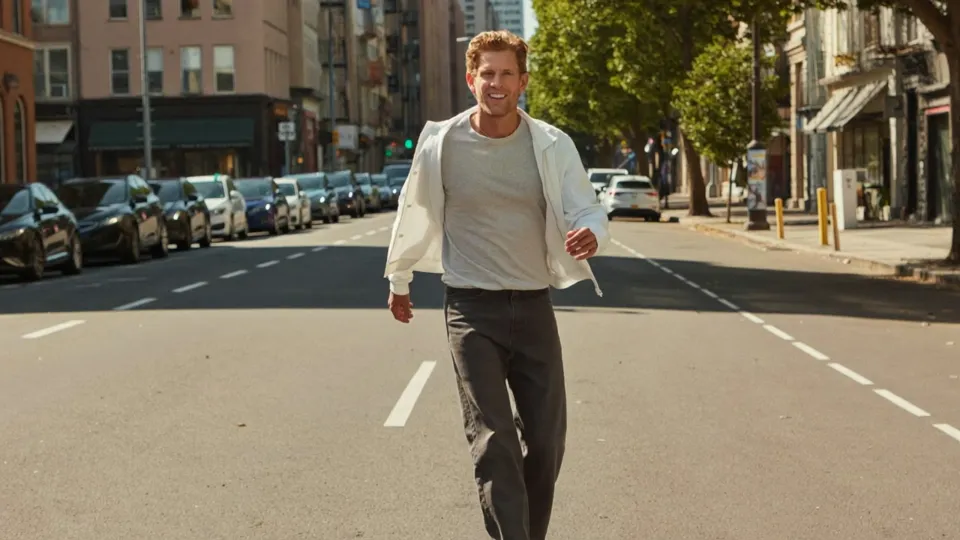
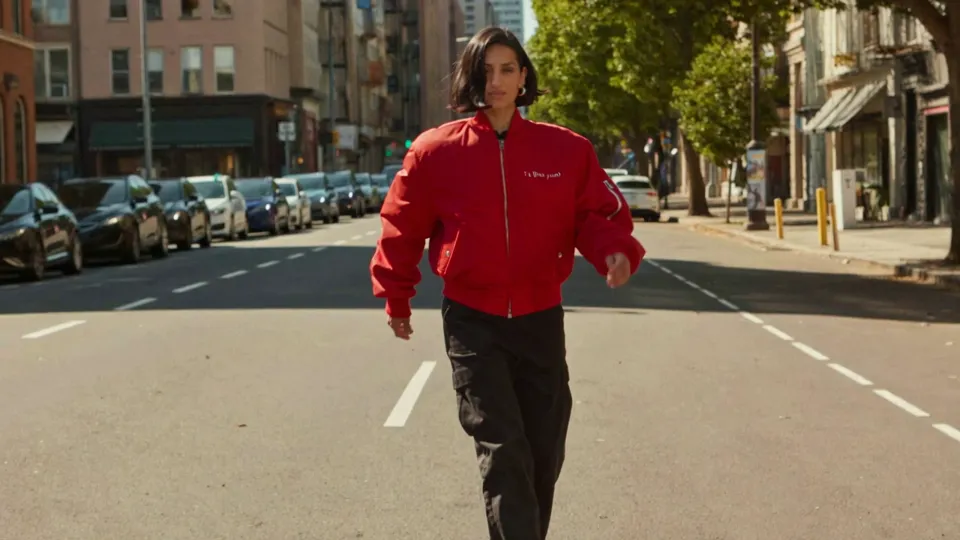
Visual inspirationA new cast.
The same story.
Français · Português · Español · Deutsch · Türkçe
- Original audioKeep the sound of the scene.
- You + your friendsCast the people you choose.
- One complete videoThe whole moment, together.
Start with a scene
A few moments to make your own.
AI-generated example scenes · Start with a sample for inspiration.
Real results
Swap the characters in a video scene with AI
Scene Recast is the AI character swap for video in Twistavo. You bring a complete scene, add a clear photo of each person you want in it, and Scene Recast replaces the people in the scene with your cast. You get back one finished video that keeps the timing, the camera movement and the original audio of the scene.
Unlike a prompt-to-video tool, Scene Recast starts from footage that already exists: the moment, the framing and the sound stay, and only the people change. It suits short, complete scenes such as a jump, a walk or a dance.
How to replace a person in a video with AI
- Choose your scene. Pick a sample scene or upload your own MP4 or MOV video, from 4 seconds to 2 minutes long and up to 200 MB. Up to 120 s in Standard 720p only; the per-job spending limit stops other tiers sooner, as early as 17 s in Max 1080p.
- Add your cast. Add 1 to 4 photos, one clear photo per person, and say who each photo replaces, for example “the person on the left”. You can add a short direction, such as keeping a red jacket.
- Review the price and create. Confirm that you have permission to use the scene and the photos, then select Review price. After you sign in and verify your email, you see the exact credit price. Nothing is charged until you confirm, and the finished video is saved in your private Library.
Character swap, face swap and motion transfer
The three terms are often mixed up. They start from different material and change different things.
| Technique | What changes | What stays | What you provide | In Twistavo |
|---|---|---|---|---|
| Character swap | Each person in the scene takes the look of a photo you add | The camera, the set, the movement, the timing and the original audio | One video scene and 1 to 4 photos | Scene Recast |
| Face swap | Only the face of a person | The body, the clothes and the rest of the video | One video and one face photo | No dedicated tool |
| Motion transfer | A still character image starts to move | The look of the character in the image | One character image and one video of the movement | Motion Control |
Ways to use a character swap
- Put yourself and your friends into a scene you filmed together.
- Restage a short clip for a social post with a different cast.
- Try casting ideas on a rough cut before a real shoot.
- Use fictional adult characters you designed instead of real people.
Limits to know before you start
- Scene length: 4 seconds to 2 minutes. Up to 120 s in Standard 720p only; the per-job spending limit stops other tiers sooner, as early as 17 s in Max 1080p. Trim longer footage first.
- Video file: one MP4 or MOV up to 200 MB. The shortest side must be at least 720 pixels and the longest side at most 3,840 pixels.
- Cast: 1 to 4 people per scene, with one JPG, PNG or WebP photo each, up to 10 MB per photo.
- Audio: the original sound of the scene is kept in the finished video.
- Long scenes: a scene longer than 15 seconds is processed in parts of up to 15 seconds, then joined back into one video.
- Results: AI results vary; clear, well-lit faces help. Your original upload is never modified.
How credits and the quote work
Scene Recast costs from 18 (Standard 720p) to 172 (Max 1080p) credits per billable second of scene, by quality and resolution, with partial seconds rounded up for each part. You see the exact price next to your balance before anything starts.
When you confirm, the price plus a 15% hold is reserved. The unused hold returns when the scene finishes, and a failed or refused generation returns all of it. Credits from plans and boosts do not expire.
Rights, consent and AI labels
Use only a scene you filmed, own or are allowed to use. Every recognisable person in the scene and in your photos must agree to be in it; keep their consent in writing so you can show it on request.
- No minors: a scene or a photo showing a minor is not allowed, even with a parent’s permission.
- No celebrities, public figures or politicians, no impersonation, and nothing that makes a real person appear to endorse a product or say something they did not say.
- No nudity, sexual content, hate or harassment, and no licensed characters or brands you do not own.
- When you publish a realistic result showing people, say that it was made with AI and use the platform’s AI label.
Questions
What is an AI character swap video?
It is a video where AI replaces the people in existing footage with other characters while the scene, the movement and the sound stay the same. In Scene Recast you choose the scene and add one photo for each new character.
Can I replace more than one person in a video?
Yes. Add up to 4 photos, one per person, and say which person in the scene each photo replaces.
Is the original audio kept?
Yes. The finished video keeps the sound of the original scene. If the scene contains music, you need the rights to use it.
How much does a scene cost?
Scene Recast uses from 18 (Standard 720p) to 172 (Max 1080p) credits per billable second of scene, by quality and resolution. You see the exact price before you confirm. A failed or refused generation returns its credits to your balance.
Can I use photos of other people?
Only with their consent, and only adults. Photos of minors, celebrities, public figures or politicians are not allowed.
Is Scene Recast a face swap?
Not exactly. Scene Recast replaces the whole person (face, hair, clothes and body) from one photo each, and keeps the camera, the set, the movement and the original audio. It does not offer a face-only swap that keeps the original body and outfit; for that, a face swap app is the right tool.
Video tutorial
How to Replace a Person in a Video with AI (Keep the Camera and Audio)